I'm not sure what to make of this trailer but I'll be watching this for sure.
Sam Altman comes across as a wannabe in real life. None of his ventures have panned out and very quickly, OpenAI no longer stands alone or as the leader of the pack.
The whole AI hype-cycle is still quite new so not sure what the narrative will be in this movie when there's, unfortunately, still a long way to go.
Link to this notable item
So, how did I do? I didn't ask for much in my wish list post last week. Just for the iPhone mini to return, a smaller Dynamic Island and cheaper phones.
That last one is unrealistic given the current RAM pricing crisis we're in the middle of, but had they kept the prices stayed the same, I'd have called success.
Apple iPhone 18 Pro & 18 Pro Max
Apple's flagship iPhones were up first. They continue to be a photographer's best friend.
Siri AI
Lots of promises have been made this year, but grounded in reality. I'm sure intents will take time to come through, but it's what Siri should have been years ago.
New thermal design
Just a year on after the introduction of the vapour chamber, there's already been an update that introduces 3 times the surface area for heat dissipation. Paired with graphite and copper layers it proves to help keep the iPhone cooler. The iPhone 18 Pro now achieves 17 Pro MAX battery life. 45 hours on the iPhone 18 Pro Max. Both amazing headline figures but the ability to charge for 5 minutes and gain 6 hours of video playback time is something to shout about!
Variable Aperture
The main camera on the iPhone now features a variable aperture. It adapts based on available light to help capture the right amount of light for the situation.
Read the post from week 463
I last put an iPhone wish list together for the iPhone 14 Pro back in 2022. It was the last time I bought a new iPhone and while I don't intend to upgrade this year, I thought it would be worth a revisit to see what Apple has ticked off and what my wish list for the next generation of iPhones is.
iPhone 14 Pro – iPhone 17 Pro
Over the last 4 generations, Apple delivered fully on 3 of my 4 wishes.
- The may or may not be smaller, but it's now a dynamic island becoming a feature rather than a obstruction.
- I missed out on USB-C by one year. From the iPhone 15 onwards, the iPhone now has USB-C in various flavours depending on how Pro you go.
- The telephoto lenses now have periscope lenses, and they did eventually move to a 5x periscope lens for the iPhone 15 Pro Max only (then both Pros for the 16). The iPhone 17 Pro now gets 4x and 8x zoom!
Read the post from week 462
I saw finally saw The Odyssey this weekend. I thought I'd missed the chance, especially to see it in the intended IMAX format, but things worked out well as it's run in UK cinemas was extended by at least a week.
This movie came out the same year in which I stumbled across Natalie Haynes Stands Up for the Classics. Natalie was a guest on The Full Disclosure podcast and I had been watching Alice Robert's Roman Empire by Train.
Once I got home, I dived straight into readying about about Odyssey to connect some of the dots.
Read the post from week 461
Every holiday we take, I take my DSLR and use it sparingly. It goes nearly everywhere with us, but comes out as a compliment to our phones.
My DSLR is over a decade old, a Canon 700D that I usually pair with a prime lens. Either my 50mm f/1.8 or 24mm f/2.8 lens. Sometimes with a telephoto lens. I never use the 18-55mm kit lens.
The photos always have more character than those taken on my phone.
So maybe out phones should do less. Or I need to take more advantage of the tools at my disposal. Especially given I spend time and energy lugging them around.
Read the post from week 460
I don't post often on Instagram, but I've made a habit of posting a gallery of photos from our holidays. I'm trying to get a specific hashtag going but Instagram are making their platform worse by the day so it's hard to bring them together in a meaningful way. If I find one, I'll update with a direct link. We just got back from Barcelona, it wasn't exactly relaxing but it was a great time away with the family exploring yet another great European city.
I also post a small selection of non-family photos to Flickr and have started to occasionally use Grain, although it's been rejecting my uploads the last few days for some reason.
Read the post from week 459
I found Couch to 5K an unbelievably good way to start pushing myself when it comes to exercise. I've used an exercise bike and often gone for long walks, but they're all very comfortable in comparison to running.
The program is really good and I'm now a massive advocate of the whole thing. I did try continuing with the graduation programs but found that the app would crash meaning I lost audio feedback and couldn't log the runs in the C25K app.
Custom workout
I found the custom workout feature for workouts on the Apple Watch to be really useful. I've set one up to start and end with 500m of walking around 4x 1km intervals. This gives me audio feedback and a clear goal to aim for rather than just running for a certain amount of time as the C25K doesn't actually use any of my Apple Watch or GPS data to determine speed and distance. It's all about endurance.
Tracking my progress
I don't have a real goal in mind, only that I want to keep it up and remain consistent. I've started tracking my post-C25K runs plotting them on a chart:
The lower the line, the faster I am (average pace) and at the time of writing I continue to surprise myself as I hit personal bests. The green line shows my 5K time, it continues to tumble and I've knocked about 3 minutes of my time. The whole thing is skewed by the including of 1km of walking, but it's a necessary warm up and knowing I will have a cool down just makes it easier to get through it all so they'll be staying.
Just knocking a few seconds of each time shows progress and as my weight falls slowly, running should just get easier and easier.
If you're reading this soon after publishing, you'll see one of my previous runs was not in keeping with the others due to a long gap between that run and the one before. Consistency seems to be key.
Read the post from week 458
Well worth a read, it made me stop to think for a minute how this looked in my own life. Shameless plug for Waylist, but part of the reason it exists was to be able to share my own experiences in other countries with others.
The Gallery in Waylist started as curated list of locations that I've visited and the locations I sought out to visit while there. I spent a lot of time curating each guide in the Gallery and will continue to do so as it grows, but nothing lands better than the ones built on my own experiences.
I continue to be sceptical about AI, but there's room for a sprinkling of it. What there isn't room for is giving into AI above everything else.
Link to this notable item
Waylist has been priced at $1.99 since launch but will be going on sale on the 28th–31st July as part of Indie App Sales. Tixato also joins the sale by going free for the duration of the Indie App Sales promotion.
You'll be able to get Waylist for 99¢ (50% off) during that time and it will return to it's normal price afterwards. Tixato has just become a paid game, but will be on sale and be free to download, returning to it's normal price from August.
Waylist does not require a subscription, it's a one time fee to get your hands on the app. Tixato is also a one time purchase, but you can get it for free during the sale.
If you'd like to know more about Waylist, a fully-featured travel planning app, you can check out some videos on it's website or you can get Waylist in the App Store.
Waylist and Tixato in the App Store
You can visit the Indie App Sales page using the link earlier in this post or head straight to the Waylist and Tixato App Store pages to take advantage of the promotion.
Read the post from week 457
Link to this notable item
I had no idea finder could snap to file and folder name lengths!
Link to this notable item
A great look at the MacBook Neo and what it might inspire in those that use one.
If I hadn't started with Swift Playgrounds on my iPad mini then there's a good chance I wouldn't have launched 1 app, let alone 3.
Use what you have, try your best, be inspired and push whatever you have to it's limits. You'll be surprised with what you can achieve and what can be achieved.
Link to this notable item
What I don't understand about the World Cup final yesterday is the Argentina have, probably, the best player to play the game and their entire approach in the last two games at least has been to bully the opposition.
Against England, they were awful. Against Spain they were even worse.
There was sweet justice in Enzo Fernandes being sent off and the Spain goal arriving of the back of a tiny lapse in concentration from Simeone.
We did not need 120 minutes of their nonsense. 90 minutes was too much. But Spain stuck to their plan, were disciplined and didn't fall for their tricks. They're world champions for a second time and deservedly so.
Read the post from week 456
If you've tried any of my apps that are currently in the App Store, it would be great to get some feedback. You can always send me a message on Bluesky or leave a review with some comments which I'll be able to see and reply too.
If you haven't tried any yet, then please do give them a go and let me know your thoughts. Waylist is a paid app, so if you'd like to get it for free I do have a very small number of promo codes I can share.
Waylist and Team Sheets both currently have 5 star ratings but with limited reviews so I'm looking to learn more about App Store distribution from that angle.
Read the post from week 455
About a year ago I came up with an idea for a game, it was a simple strategy game where you needed to take control of a board. I prototyped it and had it ready in a matter of hours. But the game play was became repetitive and predictably you would just fall into the pattern of either avoiding your appointment or you'd both counteract each other continuously.
Playing noughts and crosses (tic-tac-toe) with my son, I realised I could re-use the same mechanism to combine the two concepts and create a new strategy game based on tic-tac-toe and so Tixato was born.
Currently free, you'll find Tixato in the App Store. The price will increase come August but I'd love to get people playing and any feedback would be appreciated.
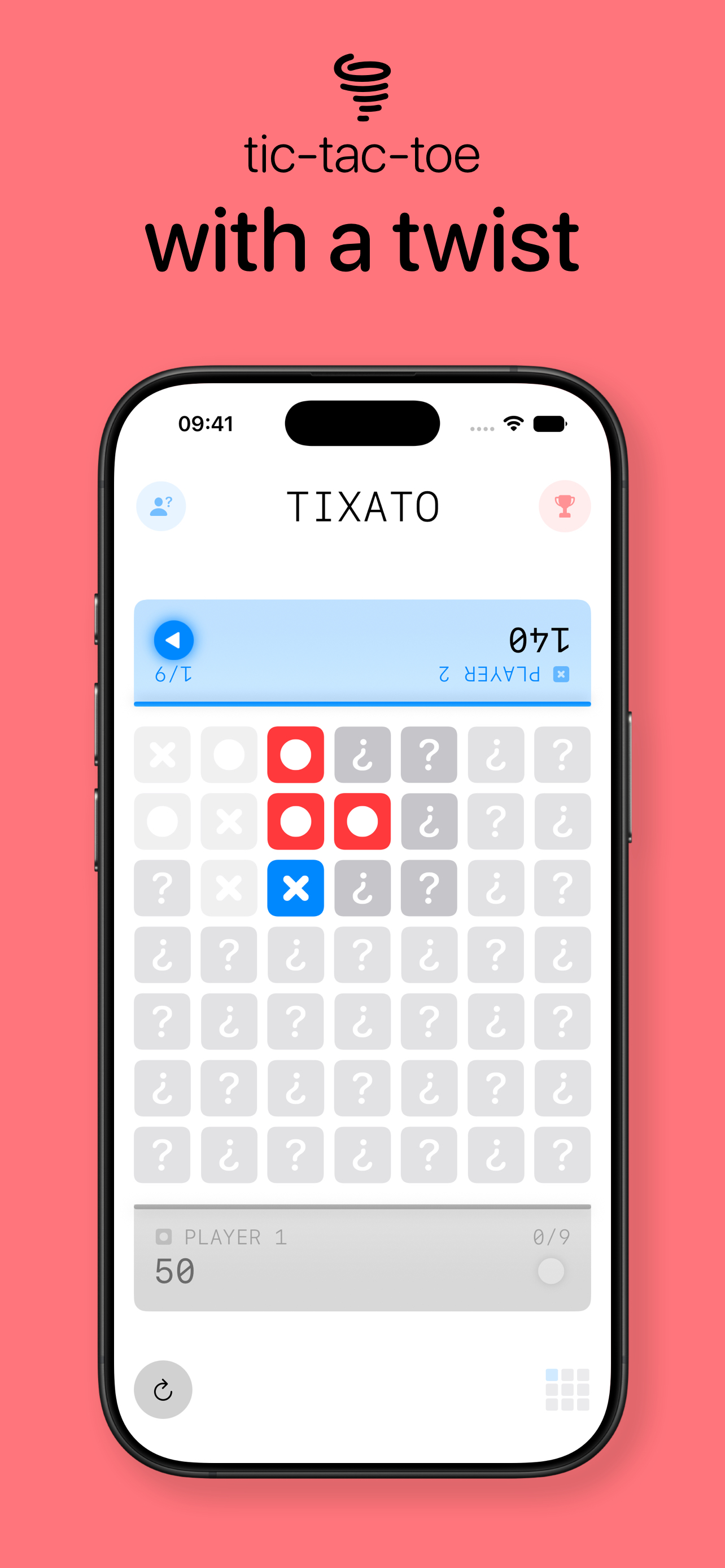
It's a game designed to be played in person, just place your device between two people and you can begin playing. It starts as a simply game of tic-tac-toe, but after the first grid, your next one is influenced by the last. As you move through, you'll find the centre grid might have been influenced by the previous 8 playable grids. First to 5 wins.
You can more details on the game play on the Tixato product page and I will be putting a product demo video together soon to really show of the simplicity and the strategy behind Tixato.
Read the post from week 454
Link to this notable item
Amazing story via kottke.org.
Link to this notable item
Comprehensive for sure. Tahoe's icons look so washed out compared to the crispness of Golden Gate. Fantastic update across the board and I've already updated the icons for Waylist to take advantage of the new settings available in the Icon Composer beta.
Link to this notable item
Link to this notable item
I've linked to 35:10 in this video where Jony Ive and Flavio Manzoni talk through the design around Ferrari's Luce. The next 4 minutes are a fantastic conversation around the task in hand when building an EV supercar versus a "regular" supercar.
I found it fascinating and feel like I should clip this and watch it often. If nothing else, I didn't realise there was effectively an exoskeleton around the Luce until I saw the animation around these points.
Also, the interior is just beautiful.
Link to this notable item
View more posts in the archive or discover more notable items.